Part 1: It works on my machine
Part 1 of 3 of A URL shortener at 30k req/s on a 6-core homelab. New here? Start with the series intro.
On my laptop, the URL shortener handled 10k req/s with a 1.23ms p99. On my homelab, the same code topped out at 2.8k req/s and then collapsed to 180. This part covers why, and the dashboard I built to find out.
The design: MD5 hashes, Redis in front of Postgres
Section titled “The design: MD5 hashes, Redis in front of Postgres”How to design a URL shortener is System Design 101 and has been covered to death. If it’s new to you, ByteByteGo goes through the choices and trade-offs.
Here are the decisions that matter for this series:
- 100M URLs a day is around 1.2k writes and 11.6k reads per second. I aimed for 10k rps in total with that same 10:1 ratio of reads to writes, as a real URL shortener would see
- I use MD5 hashing. With 365B URLs (100M a day for 10 years), collisions are very unlikely, and if a few happen, they make a negligible difference to latency. Hashing also means I don’t need a separate service such as ZooKeeper for centralized ID generation, which approaches like base62 encoding need once you scale the API horizontally, so the system has fewer moving parts.
- I’m not storing every URL for 10 years, since I don’t have the storage (~28TB for my use case). URLs expire after 24 hours (which I have not implemented yet, due to my laziness), which caps storage at around 8GB.
- I use temporary redirects (HTTP 302) instead of permanent ones (HTTP 301) so I can capture click rate (not implemented either. Have I mentioned I can be lazy?).
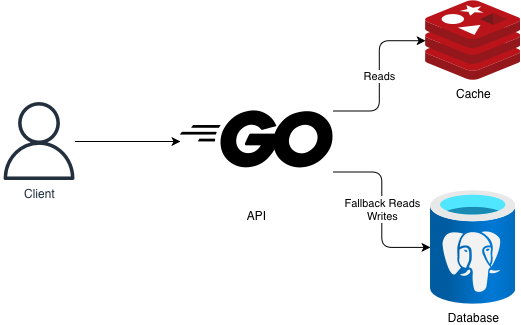
- A cache (Redis) in front of a database (Postgres) for reads
Overall the design is quite vanilla, and looks like this:
It works on my machine
Section titled “It works on my machine”Local development was uneventful. After writing the Go code for the API, I ran the design above with Docker Compose and load tested it with k6.
The repo is public, so you can find them on GitHub:
- Docker Compose
- k6 load tests
- Taskfile: I use it as a
Makefilereplacement for running common commands
I made no adjustments to the Postgres connection pool, so the application used the defaults of pgx, the Go library I use to talk to Postgres. For Redis, through go-redis, I set a modest pool of 20 connections.
I also didn’t set resource limits for any container in the Docker Compose file (who needs those, right?). The API, Postgres, Redis and k6 itself were all sharing my laptop, free to use as much as they needed.
k6 ramped up requests until it hit 10k rps, and then held that throughput. I called this the steady phase of the load test.
For reference, my laptop is a MacBook M4 Pro, with 12 cores and 24GB of unified memory.
Off to the races I went, with a load test at 10k rps:
- 10k clean rps
- 0 errors
- 1.23ms p99 during the
steadyphase
Look at me! This is pretty easy, right? I’m going to the major leagues.
Then I deployed to my homelab: an older, slower CPU, already shared with a lot of other services.
And so the rabbit hole started.
The homelab and its network
Section titled “The homelab and its network”Many of the limits I hit come from how the homelab is set up.
It’s a Hetzner server I got at an auction, running:
- Headscale: self-hosted Tailscale, so I have my own private mesh network for things I don’t want on the public internet (many of the services in my cluster)
- Proxmox: a hypervisor, so I can run VMs inside the server as Kubernetes nodes
- Talos Linux: an OS made for Kubernetes, which I run inside each VM
At the moment I am rocking 3 VMs: one control plane node, one system node (for my services) and one worker node (for my applications). Yes, I have downtime when updating any of them, but I can live with that on my modest box.
I initially had more VMs. Trimming them down to 3 cut network hops between VMs, which reduced p99 latency from 493ms to 96ms. I lost the dashboards from those runs and only kept a few numbers (oops!), so that’s all I’ll say about it.
Carving out IP ranges for nodes, pods and services, and getting the nodes onto the mesh, took some work too, but that belongs in its own homelab series.
So what is the network path between a client and the pods? It depends on whether the client is on the mesh or the public internet:
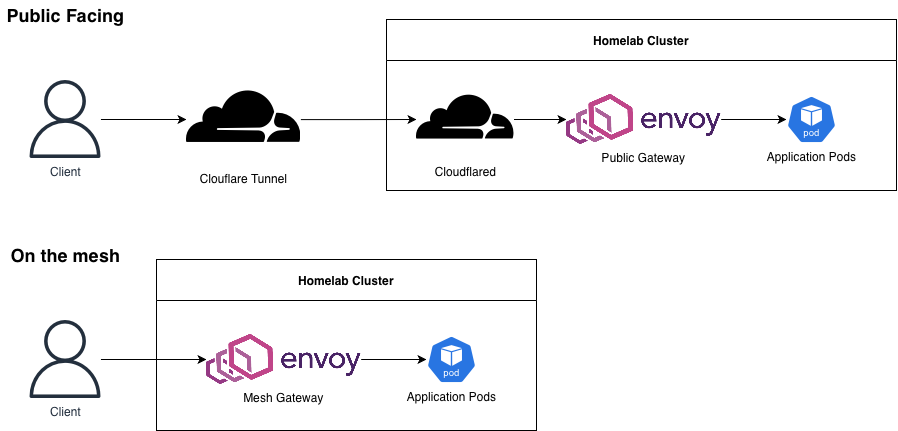
Yes, I left the host’s IP forwarding out of the picture on purpose. Some more context:
- The diagram doesn’t show it, but I use Cilium as the Container Network Interface plugin for my cluster. This will be relevant later (wink, wink).
- I have two Envoy Gateways (following the Kubernetes Gateway API) acting as L7 proxies for my applications, one for mesh traffic and one for public traffic. kgateway is the Gateway Controller.
- I wanted to try Cloudflare Tunnels, so I created one and deployed cloudflared on the cluster. My applications can be reached from the public internet without the host opening any extra ports. It’s pretty cool.
This is a standard networking setup for Kubernetes (cloudflared aside), so I didn’t think I’d need to worry about it.
Spoiler alert: it came to bite me in the ass, but we’ll get there.
The cluster also runs a bunch of other services:
- Grafana: dashboards for monitoring
- Victoria Metrics: metrics collection, storage and querying (I wanted to try something other than Prometheus)
- ArgoCD: for GitOps
- Cert Manager: automated provisioning of TLS certificates
- External DNS: keeps DNS records in Cloudflare (my DNS provider) in sync with the services in my cluster
- CloudNativePG: running Postgres on Kubernetes
And a few more. The point is: my modest box is already busy.
Maybe it only works on my machine…
Section titled “Maybe it only works on my machine…”Alright, 10k rps first try locally, time to deploy!
In my cluster, though, I am strict about pod requests and limits, which I hadn’t set with Docker Compose. So I had to pick CPU and memory numbers for the API, Postgres and Redis.
So I did what any sensible person would do and pulled those numbers out of my ass.
I decided, in my infinite wisdom, to set:
- API at 500m CPU and 200Mi with no
GOMAXPROCSor memory limit for Go - Postgres at 500m
- Redis at 500m without
maxmemory
Deploy and…
What??? Maximum 2.8k clean requests per second? During the steady phase of the load test only 180 requests per second succeeded? What do you mean?
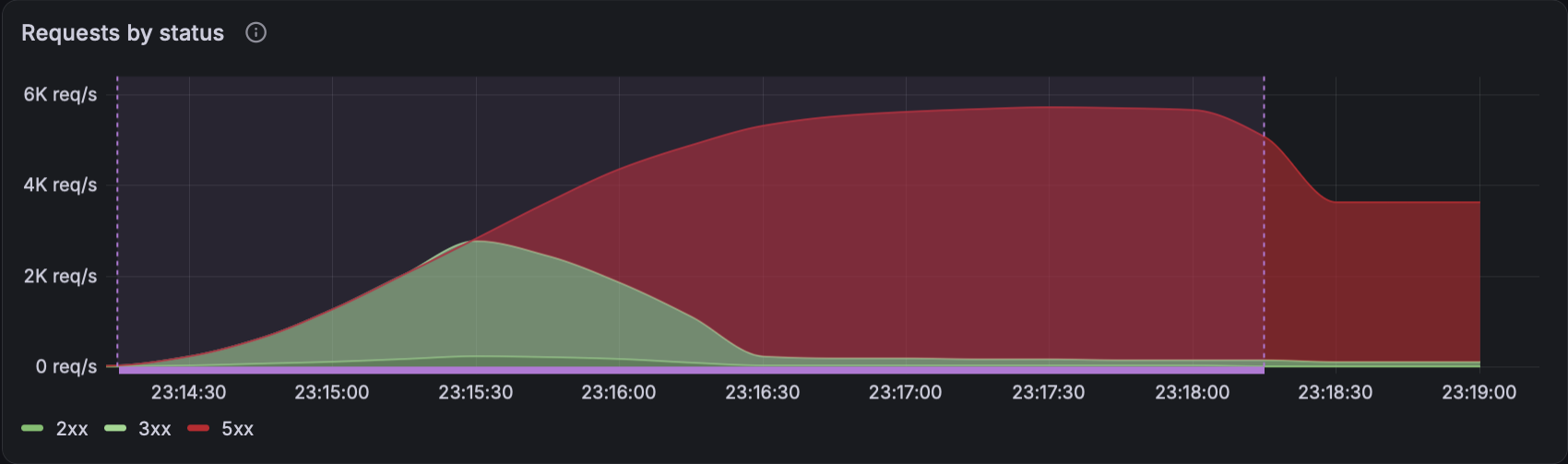
My dreams were shattered. But instead of tweaking and re-running tests until I stumbled into a good configuration, I made the decision this whole series comes from: let’s measure first.
And so I began instrumenting my code.
What the dashboard measures, and what gauges hide
Section titled “What the dashboard measures, and what gauges hide”At first I only used the Prometheus Go client to instrument HTTP responses from my API. As I ran more experiments, the instrumentation grew so I could pinpoint errors better.
In Part 2, I’ll show what I wasn’t measuring at the time, and how that pointed me at the wrong bottleneck.
From those metrics I built a Grafana dashboard with:
- Top level metrics: p99 latency, req/s per status code, error rate burn, …
- Host metrics: resource usage, CPU pressure (share of time work waits for a CPU in each Kubernetes node), CPU steal (share of time a Proxmox VM wanted CPU, but Proxmox gave it to another node)
- Gateway metrics: in-flight requests, resource usage, latency as seen from the gateway, …
- API metrics: latency per route, errors by status code, average latency broken down (waiting for a connection, waiting for a response from db or cache, running actual API level code, …), resource usage, …
- Go metrics: Go scheduler wait time and share of CPU used for garbage collection
- Redis: resource usage, pool usage, command latency, errors by type, cache hit ratio, …
- Postgres: resource usage, pool usage, query latency, errors by type, …
Here’s the dashboard’s landing page:
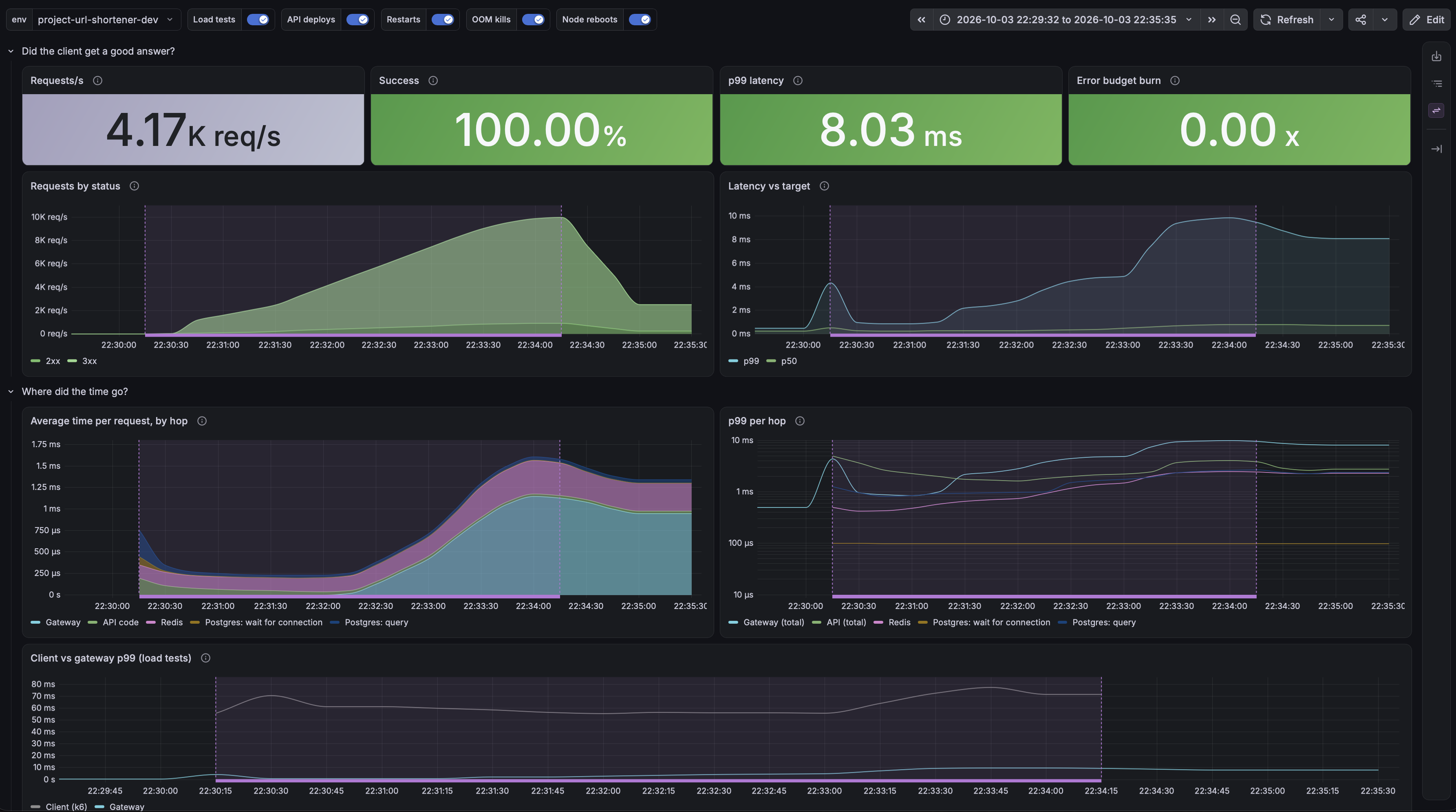
It also annotates load test runs (the purple area in the background), new deployments, OOM kills, etc. It evolved quite a lot with the help of Cláudio (the Portuguese name I jokingly use for Claude) after I got bored of doing everything by hand.
Most of these metrics were already exposed by services running in Kubernetes. Postgres and Redis needed two tweaks, though:
pgx, the library I use to talk to Postgres in Go, exports pool metrics (connections in use, idle, …) as Gauges. Gauges are point in time metrics: they tell you what’s happening right now, and nothing else. Victoria Metrics scraped every 5 seconds, so everything that happened in between was lost. During spikes, the pool could look fine while it was choking between two scrapes.go-redishas exactly the same problem
The fix: record every wait for a connection in a Histogram, so no wait can hide between two scrapes, and count the seconds each connection is held in a Counter, whose rate is the average number of connections in use. Implementing this for pgx and go-redis is slightly different, though:
pgxhas an.Acquire()method to explicitly take a connection from the pool, so timing it is just a matter of timing.Acquire(). Pretty easy.go-redishas no such method: it acquires and releases connections on its own. So I wrote my own counting semaphore with a buffered Go channel, and timed how long it took to acquire a slot.
From here on out, every result and conclusion in this series comes from this dashboard.
Why a 500m CPU limit collapses the API
Section titled “Why a 500m CPU limit collapses the API”Alright, let’s figure out why my homelab tops out at 2.8k rps. Run the load test again, check the dashboard, and…
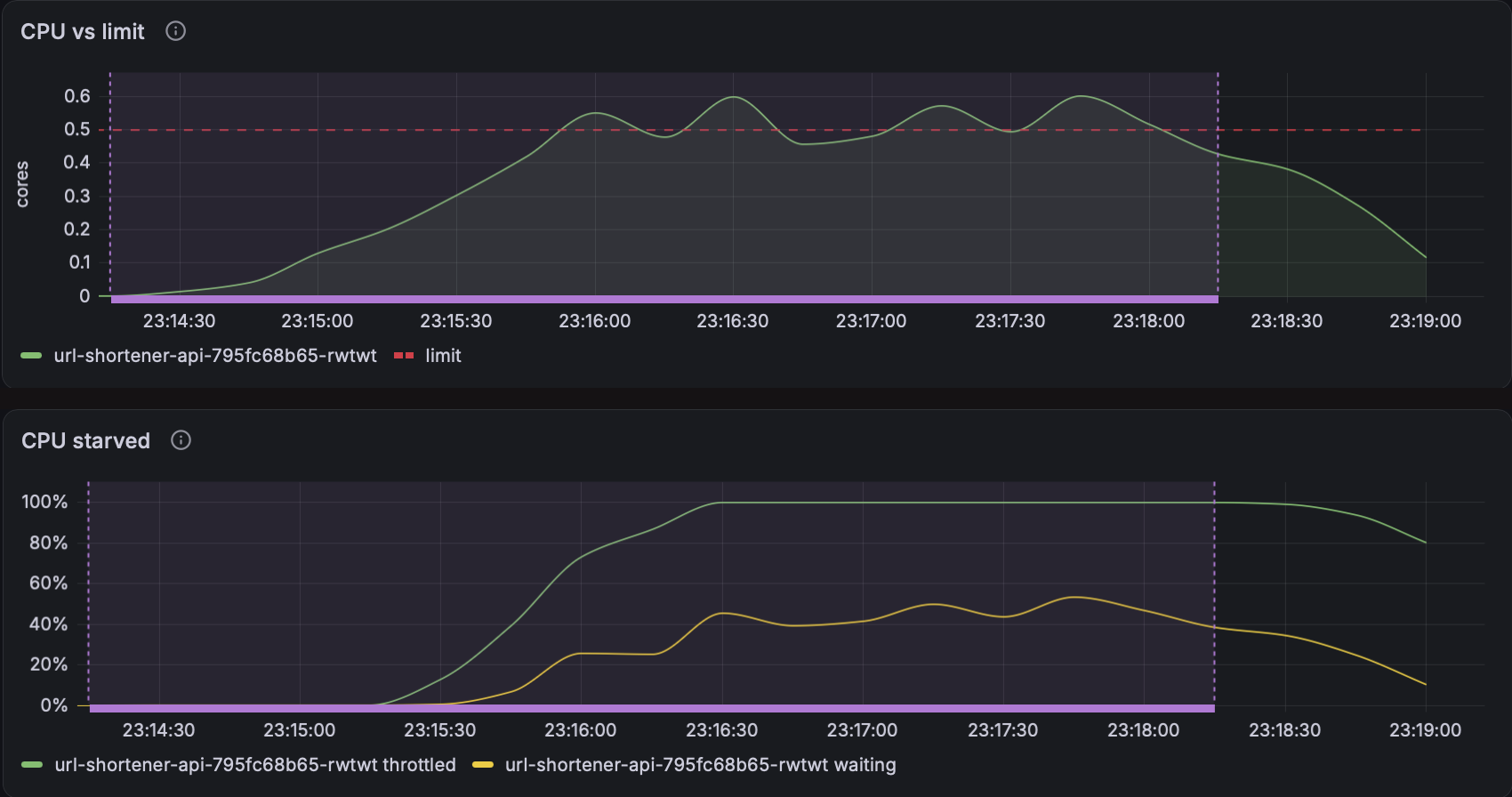
Well, that explains it… The API gets CPU throttled, the Go scheduler waits more and more before it can keep working, requests queue, everything goes to hell…
Why so bad? Go reads the container’s CPU limit, but it never runs on fewer than 2 threads. A 500m limit allows 50ms of CPU in every 100ms period. 2 busy threads use that up in the first 25ms, and then get paused for the other 75ms.
And why did it collapse to 180 req/s instead of staying at 2.8k? Once requests queue for longer than their timeouts, the API spends its little CPU on work that clients have already given up on. Almost nothing finishes in time.
Not an amazing insight (raising the CPU limit is the first thing I’d have tried anyway), but hey! At least we’re making data-driven decisions, right?
Perhaps I should’ve pulled those numbers out of somewhere else…
Alright! Increase the API’s CPU limit to 3, including GOMAXPROCS. That section of my deployment looked like this:
apiVersion: apps/v1kind: Deployment... spec: containers: - name: api env: - name: GOMAXPROCS valueFrom: resourceFieldRef: containerName: api resource: limits.cpu divisor: "1" - name: MEMORY_LIMIT_BYTES valueFrom: resourceFieldRef: containerName: api resource: limits.memory divisor: "1" ... resources: requests: cpu: 1 memory: 100Mi limits: cpu: 3 memory: 500MiGo reads GOMAXPROCS on its own, but not MEMORY_LIMIT_BYTES. The API reads it at startup and sets Go’s memory limit to 90% of it with debug.SetMemoryLimit, leaving the rest for memory Go doesn’t account for.
I also raised Postgres’s CPU limit to 2 and Redis’s to 1 just for good measure, set maxmemory for Redis and pools of 20 Postgres and 50 Redis connections (not the most careful use of the scientific method, changing one variable at a time, but alas).
Run again, and:
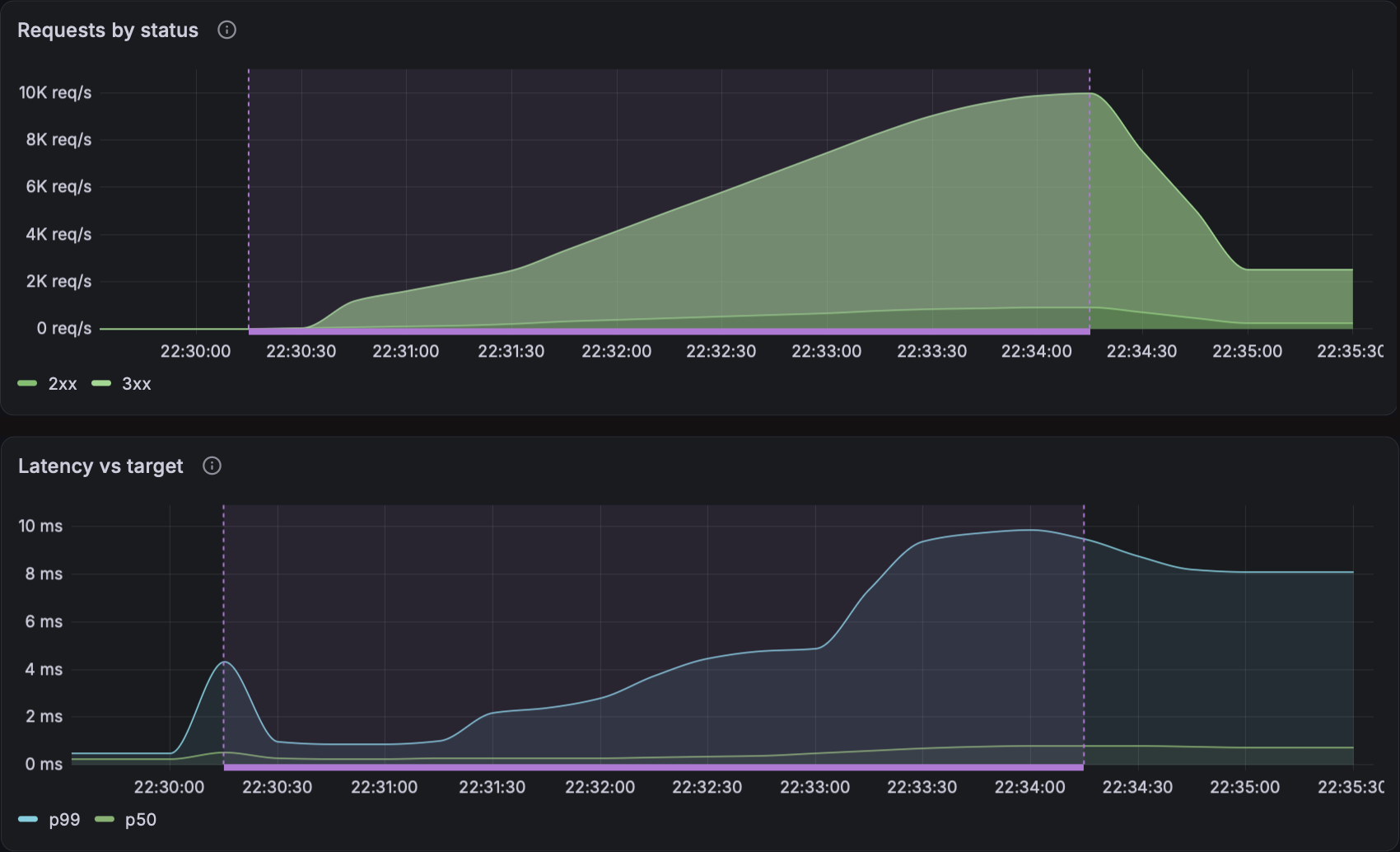
Nice! 10k rps, no errors, 8ms p99 (70ms as seen from k6, because of the latency from my laptop to the Hetzner server). We finally did it!
I took a second to appreciate what I had done to get this working. What marvelous beauty.
And then, completely dismissing the achievement of 5 seconds ago, for it was now in the past, I thought: I wonder how much further I could go?
Further than I expected, as it turns out, but every step from here meant finding a bottleneck I hadn’t seen coming.