Part 2: How far can one box go?
Part 2 of 3 of A URL shortener at 30k req/s on a 6-core homelab. New here? Start with the series intro.
Part 1 ended at 10k req/s. Pushing for 20k, the API said about 60ms of every request went to Redis, while Redis itself said its commands took 6ms.
This part is about which one was lying, and why.
At 20k req/s, 503s and a slow Redis
Section titled “At 20k req/s, 503s and a slow Redis”I tried several optimizations after Part 1, but only two made a real difference. One was cutting the cluster down to 3 VMs, which I mentioned in Part 1 (and lost the data for). This part covers the other.
First, a load test with a more ambitious target: k6 at 20k rps, and go!
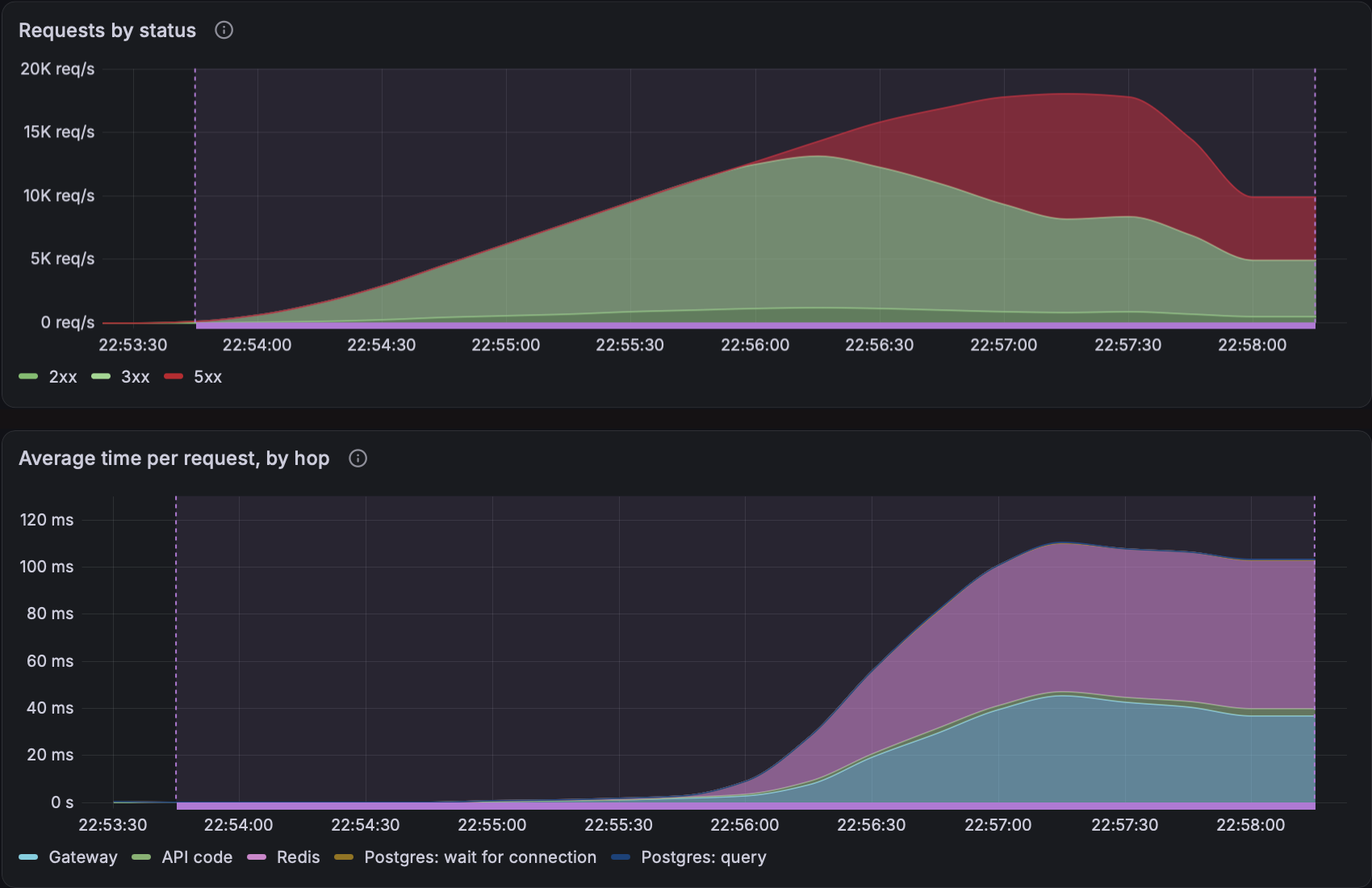
Hmmm, it reaches around 18k rps, alright, but the API starts throwing 503s (about 5k per second, peaking at 10k), so only around 13k rps are clean, with p99 latency at about 450ms.
The bottom panel, “Average time per request, by hop”, shows where that time goes. Two parts of the request path take longer and longer as rps grows:
- Redis
- Gateway (Envoy)
Redis seems to be the major contributor, at around 60ms of every request.
All of the errors are 503s, and the API’s dashboard tab says why:
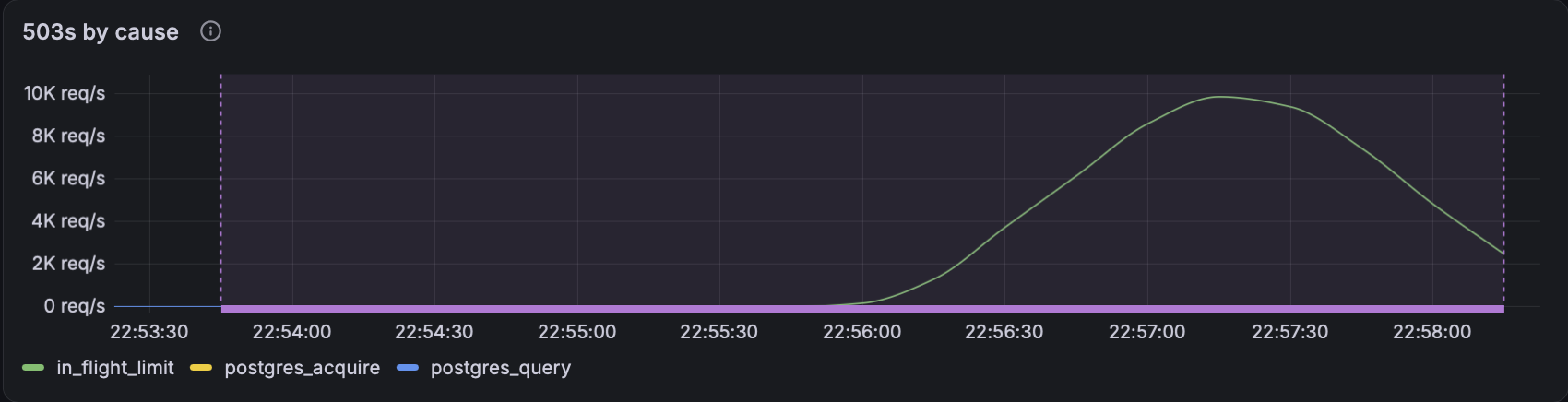
All of them are in_flight_limit. The API has a counting semaphore that limits how many requests it keeps in flight. Past that number, it answers 503 to say it’s overloaded.
That in-flight limit definitely needed some tuning, since latency still spiked badly, but let’s forget that for now.
So: the Gateway and Redis parts of the request path got slower, requests queued up in the API until they hit the in-flight limit, and then came a storm of errors.
What we don’t know yet is why the Gateway and Redis got slower.
Redis looks slow, but only from the API
Section titled “Redis looks slow, but only from the API”Funnily enough, the first time I ran this benchmark, my dashboard was a lot more modest. I wasn’t monitoring the Gateway or the Redis deployment at all.
All I knew was that Redis latency was spiking as seen from the API. So I spent some time tuning its connection pool size and its CPU and memory resources.
That was to no avail, because, as we are about to see, I was looking in the wrong place.
With the full dashboard, here’s Redis:
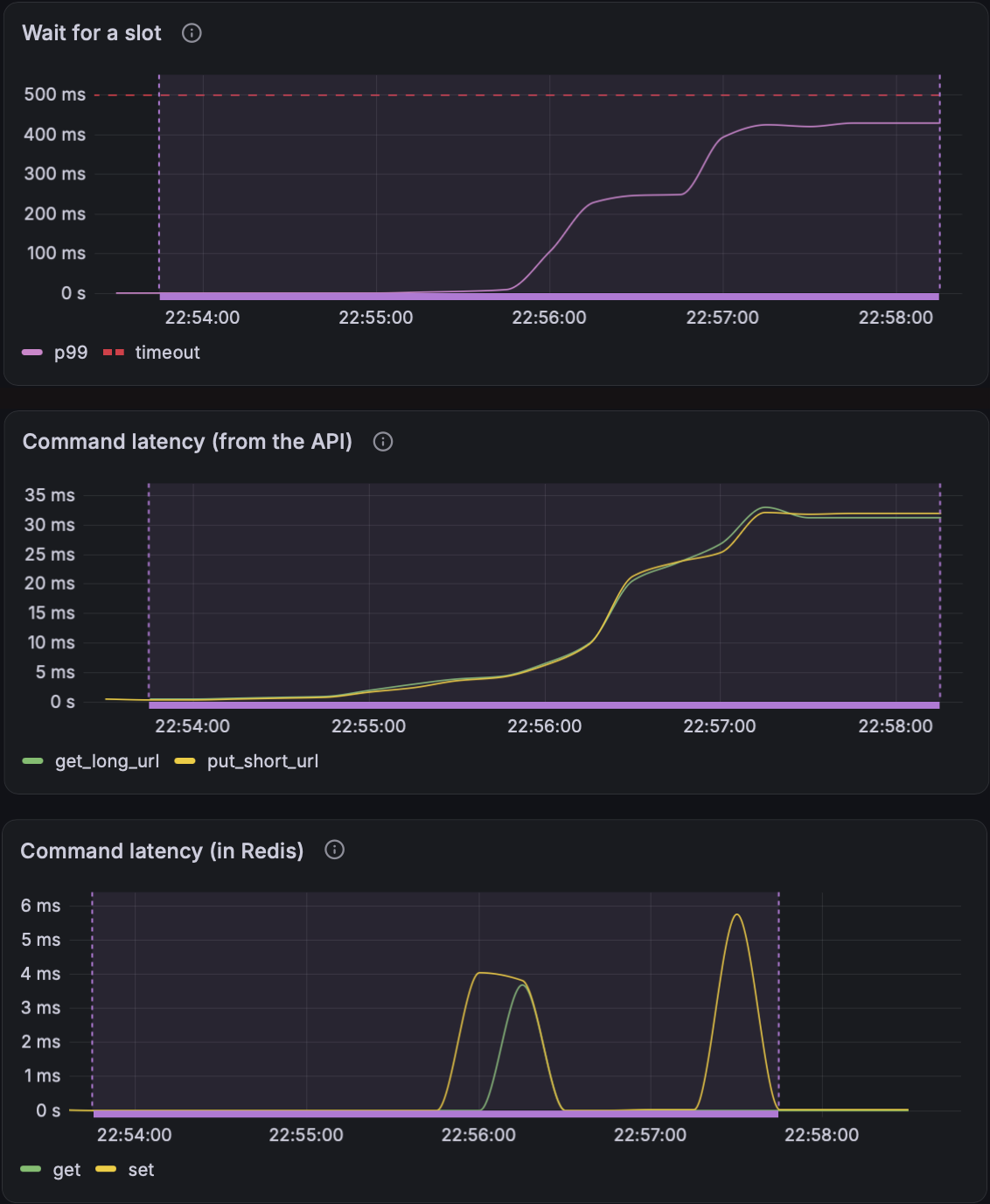
The rest of the Redis tab looks healthy (CPU and memory aren’t under pressure, and the cache hit ratio is at 100%) apart from some timeout errors, and wait…
Up to 400ms waiting for a connection? And Redis commands run in 6ms at most? But the API timed those same commands at over 30ms, and put about 60ms of every request in Redis, 10x what Redis says… That’s fishy…
Envoy is using 4 vCPU
Section titled “Envoy is using 4 vCPU”Latency was also climbing in the Gateway, so let’s look at it:
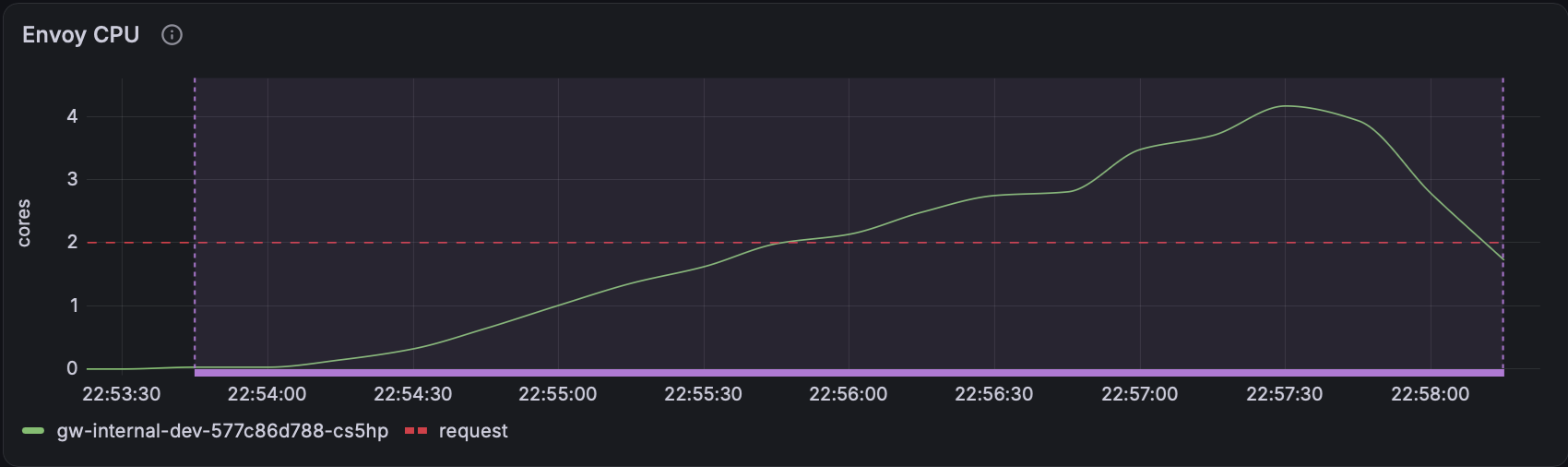
Damn… an L7 proxy using upwards of 4 vCPU?
On top of that, the Gateway is configured with a concurrency of 4, so it can only use 4 threads, and it’s at that limit.
I have to admit, when I first deployed it, I thought it would just be chilling there. That damn thing does not seem to be chilling, does it?
The host is overcommitted on CPU
Section titled “The host is overcommitted on CPU”So between the Gateway, API, Redis, Postgres, all the other shenanigans in my cluster and the host itself, how much CPU is in use, really?
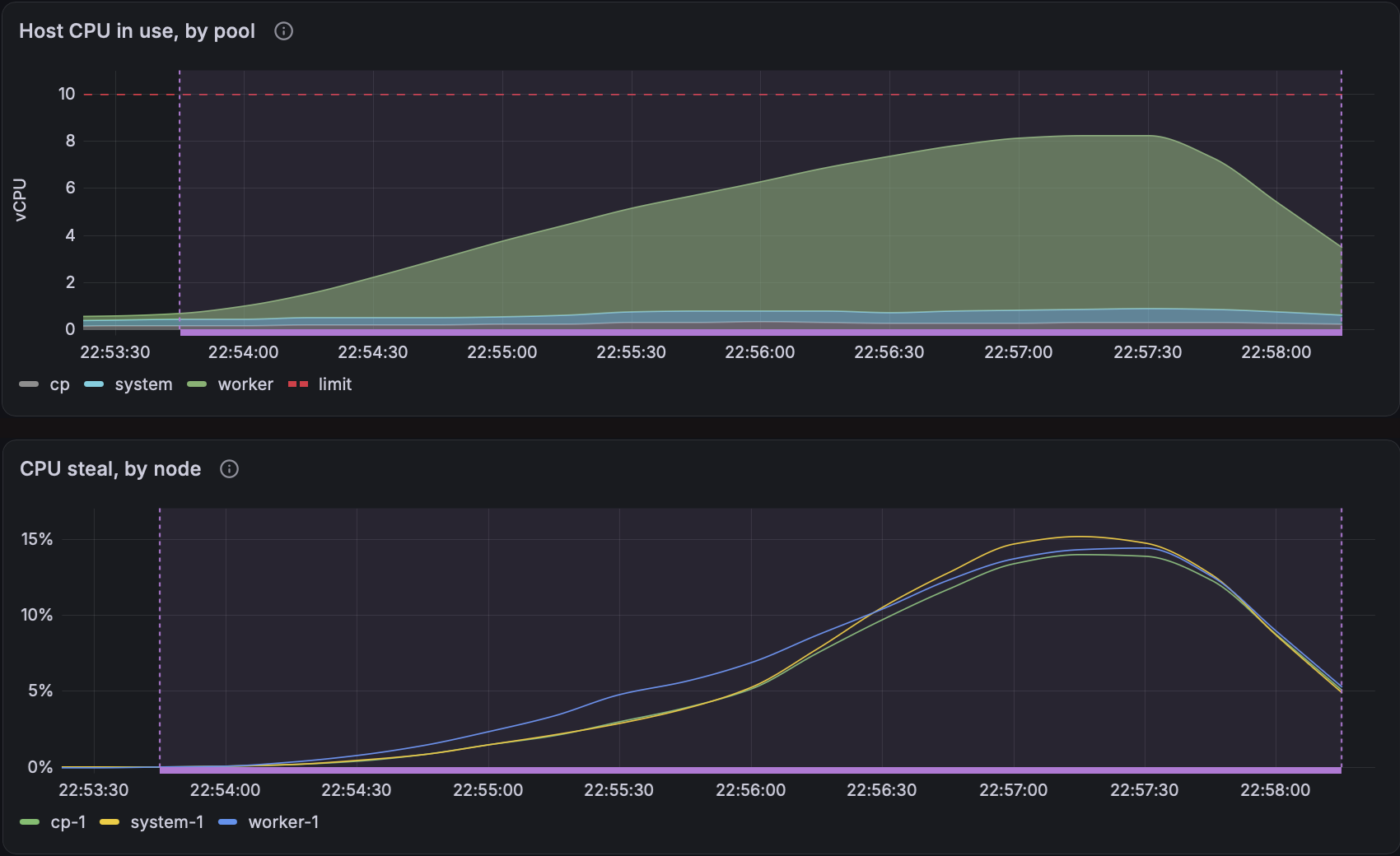
Since I am a greedy bastard, I gave 10 vCPU to my worker VM, and 2 vCPU each to the other two VMs. Each vCPU is one thread on the host, so that’s up to 14 threads for the VMs. The host only has 12, and it needs some for itself too.
The result is CPU steal, peaking at around 15%. Proxmox has promised the VMs more CPU than it has, so instead of getting the CPU they were promised, VMs wait for each other to get CPU time.
Which means the worker VM, the Kubernetes node running our application and Gateway, isn’t getting all the CPU it was promised, even though it’s not using all 10 vCPU.
The real culprit: Go scheduler wait
Section titled “The real culprit: Go scheduler wait”To put the nail in the coffin, let’s look at the API’s Go metrics:
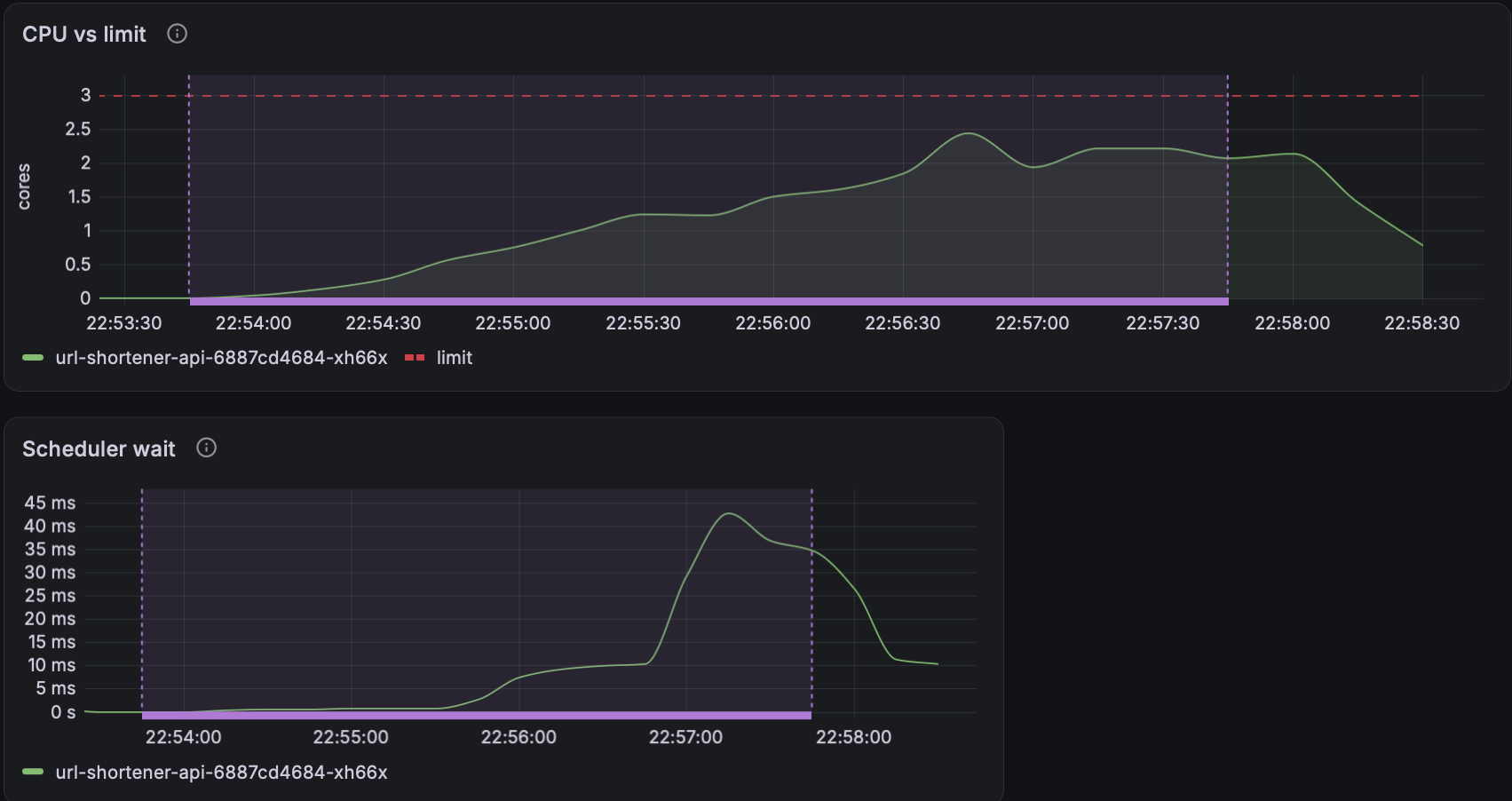
CPU usage is getting close to its limit, at about 2.4 of 3 cores, not a great start.
Even worse is “Scheduler wait”, below it: how long a goroutine waits for a thread before it can resume work. With this many requests coming in, the API is running a lot of goroutines.
Scheduler wait rises to almost 45ms! Before, it was in the order of microseconds. That’s a LOT of time spent waiting instead of handling requests.
Aaaaand that explains the Redis numbers. To time a Redis call, the goroutine:
- Starts a timer
- Acquires a Redis connection
- Runs the Redis command
- Records the total time, for Victoria Metrics to scrape and the dashboard to show
The goroutine can be paused at any of these steps, for up to 45ms. When it’s paused while acquiring the connection (step 2), the connection wait rises. And wherever it’s paused, the total Redis time the API reports rises too, while Redis itself still says 6ms.
It’s one cheeky bottleneck, isn’t it?
The full chain, from CPU steal to 503s
Section titled “The full chain, from CPU steal to 503s”Summarizing what happened:
- Requests rise quickly
- The host, Gateway, API, Postgres and Redis all use more resources to keep up
- The host runs out of CPU
- With the host overcommitted on CPU, Proxmox starts to ‘steal’ CPU from VMs
- Gateway latency spikes: Envoy is at its 4-thread cap, and its CPU is being stolen too
- The API is close to its own 3-CPU limit, and its node’s CPU is being stolen, so goroutine wait times skyrocket
- Redis connection acquisition times skyrocket
- Overall latency goes through the roof
- Requests queue up in the API
- In-flight limits are reached
- 503s everywhere, a sea of red on the dashboard
- Make the bastard writing this post spend a shit-ton of time figuring out what’s going on
So hurray! We:
- Hit 13k clean rps
- Found the bottleneck: the host’s CPU, with the API getting close to its own limit too
But what can I actually do about that? Can we… go further?
That’s Part 3.