Part 3: Cutting out the middlemen
Part 3 of 3 of A URL shortener at 30k req/s on a 6-core homelab. New here? Start with the series intro.
In Part 2, Envoy was using 4 of the host’s 12 threads just to route requests to one app, and the host had run out of CPU.
Taking Envoy out of the request path freed those 4 vCPU and, with a few more changes, got the same box from 13k to ~30k clean req/s.
Does the mesh need a proxy?
Section titled “Does the mesh need a proxy?”The natural question was: why do I need it? Sure, most Kubernetes setups use Gateway API, but why?
In the homelab, Envoy is the implementation of Kubernetes’ Gateway API: an L7 proxy that routes requests based on HTTP semantics, and handles TLS and circuit breaking. Envoy can do a whole lot more than that, but those are the features I use.
So do I need them?
For encryption, the mesh already has it covered: Headscale coordinates the mesh, and Tailscale on each device (the homelab host included) encrypts traffic between them with WireGuard. Past the host, from the VMs into the pods, traffic travels unencrypted, but it never leaves the physical machine.
Circuit breakers are nice to have, but not strictly necessary: the API already protects itself with its in-flight limit, answering 503 when it’s overloaded.
What remains is request routing. Does this application need L7 routing? Turns out: no, it does not.
Here’s how routing works with Gateway API in the cluster:
- I define a domain with a wildcard certificate, in my case
*.dev.k8s.homelab.grncunha.com - The mesh Gateway accepts any subdomain, and each app adds a route for its own name, such as
url-shortener.dev.k8s.homelab.grncunha.com - External DNS creates a DNS record mapping that subdomain to the IP of the Cilium load balancer in front of the Gateway (yes, there’s already an L4 load balancer in the path!)
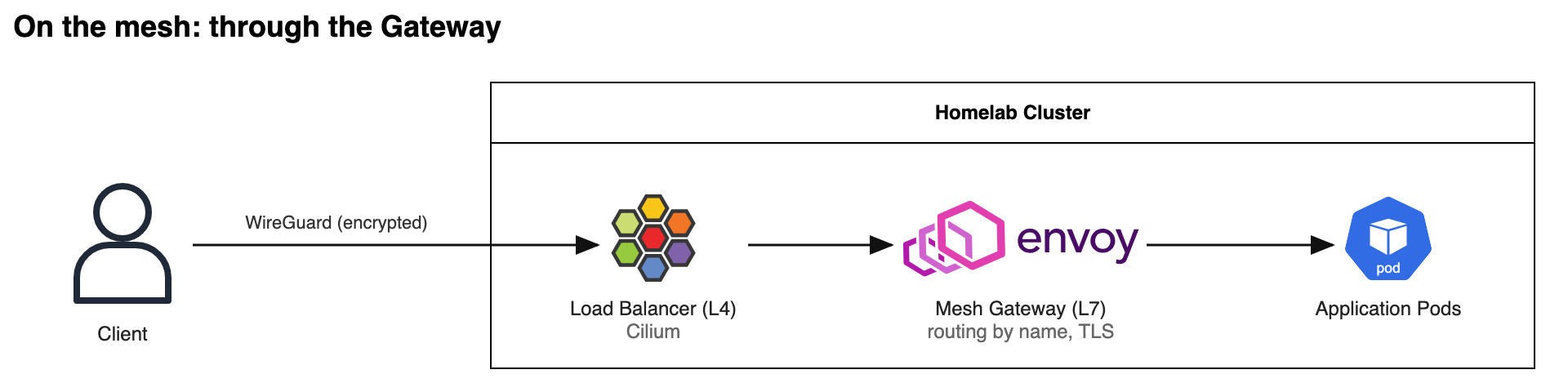
So… why not cut out the middleman?
Instead, the DNS record can point to an L4 load balancer created just for this application, which sends traffic straight to its pods, and WireGuard still encrypts it on the way to the server:
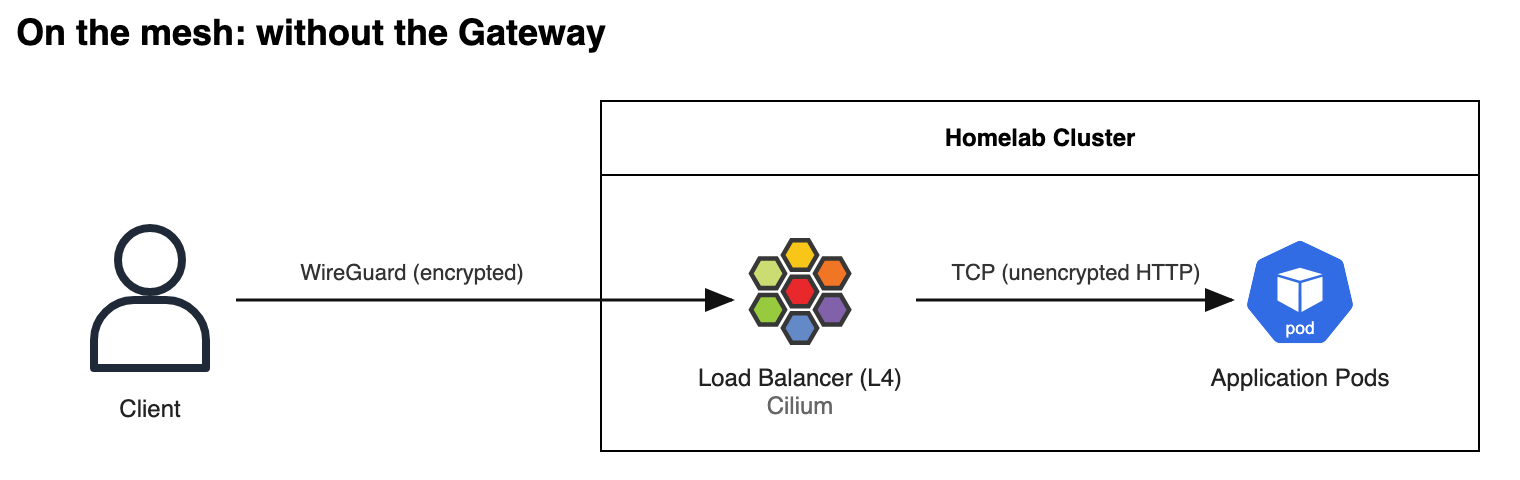
That takes Envoy out of the request path.
What dropping Envoy costs
Section titled “What dropping Envoy costs”This isn’t free, and I wouldn’t do it for every app:
- No L7 features at the edge: no retries, timeouts, header-based routing or circuit breaking. The API’s in-flight limit is the only overload protection left.
- Less visibility: Envoy’s access logs and per-route metrics are gone, so the API’s own instrumentation is all I have.
- One load balancer IP per app: behind the Gateway, every app shared one IP and one wildcard certificate. Now every app that skips the Gateway takes its own IP from Cilium’s pool.
- Mesh traffic only: this works because WireGuard already encrypts mesh traffic. Public traffic through cloudflared still goes through the public Gateway.
The alternatives all keep the cost:
- Raising Envoy’s concurrency gives it more of the CPU the host doesn’t have.
- Moving it to the system node moves the CPU cost instead of removing it, and that node only has 2 vCPU.
- Cilium’s own Gateway API implementation also runs Envoy under the hood.
~30k req/s, and a home upload limit
Section titled “~30k req/s, and a home upload limit”Removing Envoy wasn’t the only change, though.
First, the API was also getting close to its CPU limit last time, so I gave it some of the CPU Envoy freed, going from 3 to 5 vCPU. While at it, I raised the Redis connection pool from 50 to 150, and the API’s in-flight limit from 1,200 to 2,000: at these rates, bursts were filling both.
Second, a new bottleneck showed up somewhere between 16k and 18k rps: my home internet’s upload speed, which is only around 50 Mbps.
So I spun up a server in Hetzner Cloud, connected it to my mesh network, ran the load test from there, and sent it to the shadow realm once it had served its purpose.
With all that:
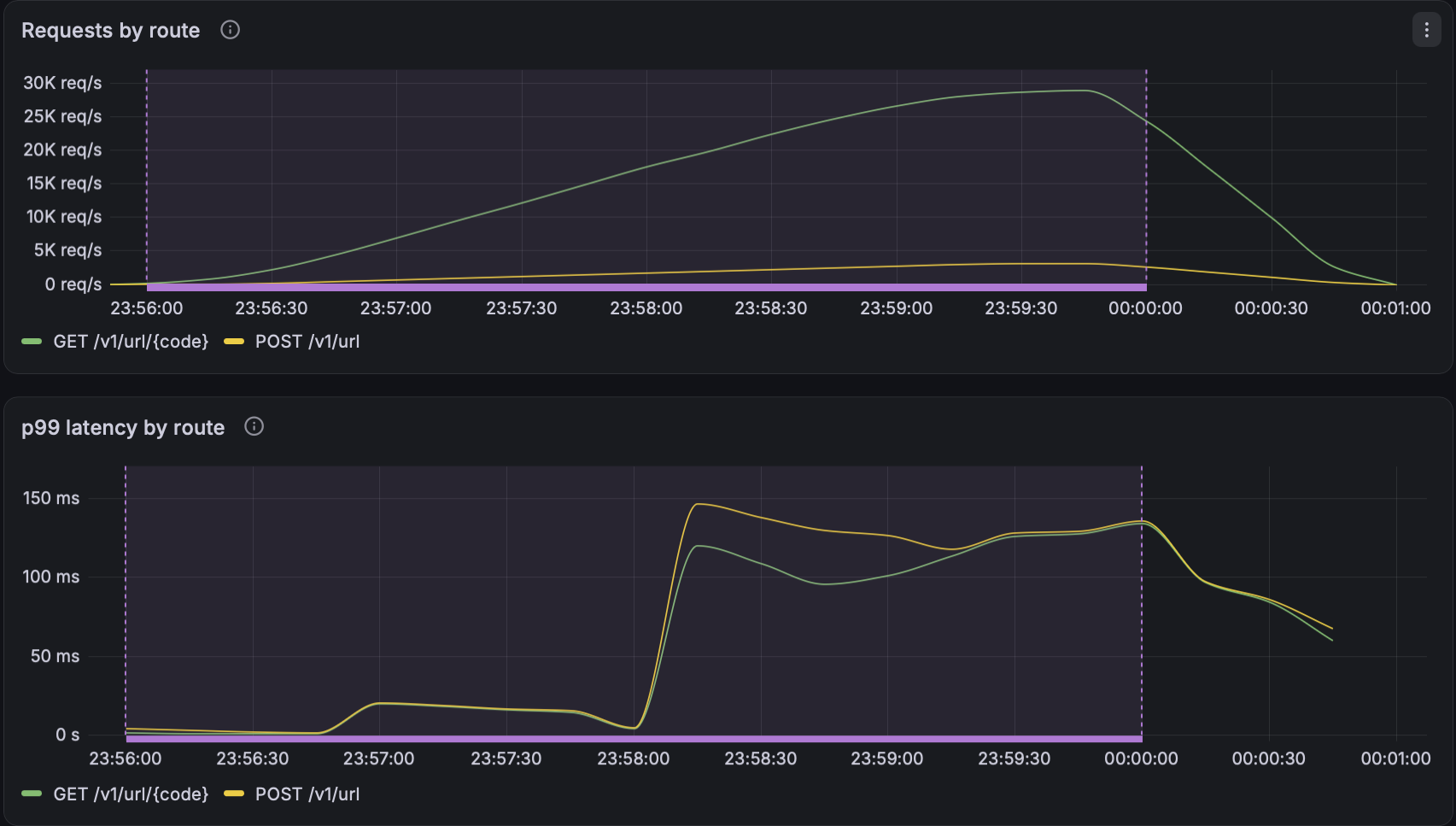
Around 32k rps reached the API, and ~2k of those failed on the in-flight limit: about 30k clean rps, with p99 latency at about 150ms. On the host:
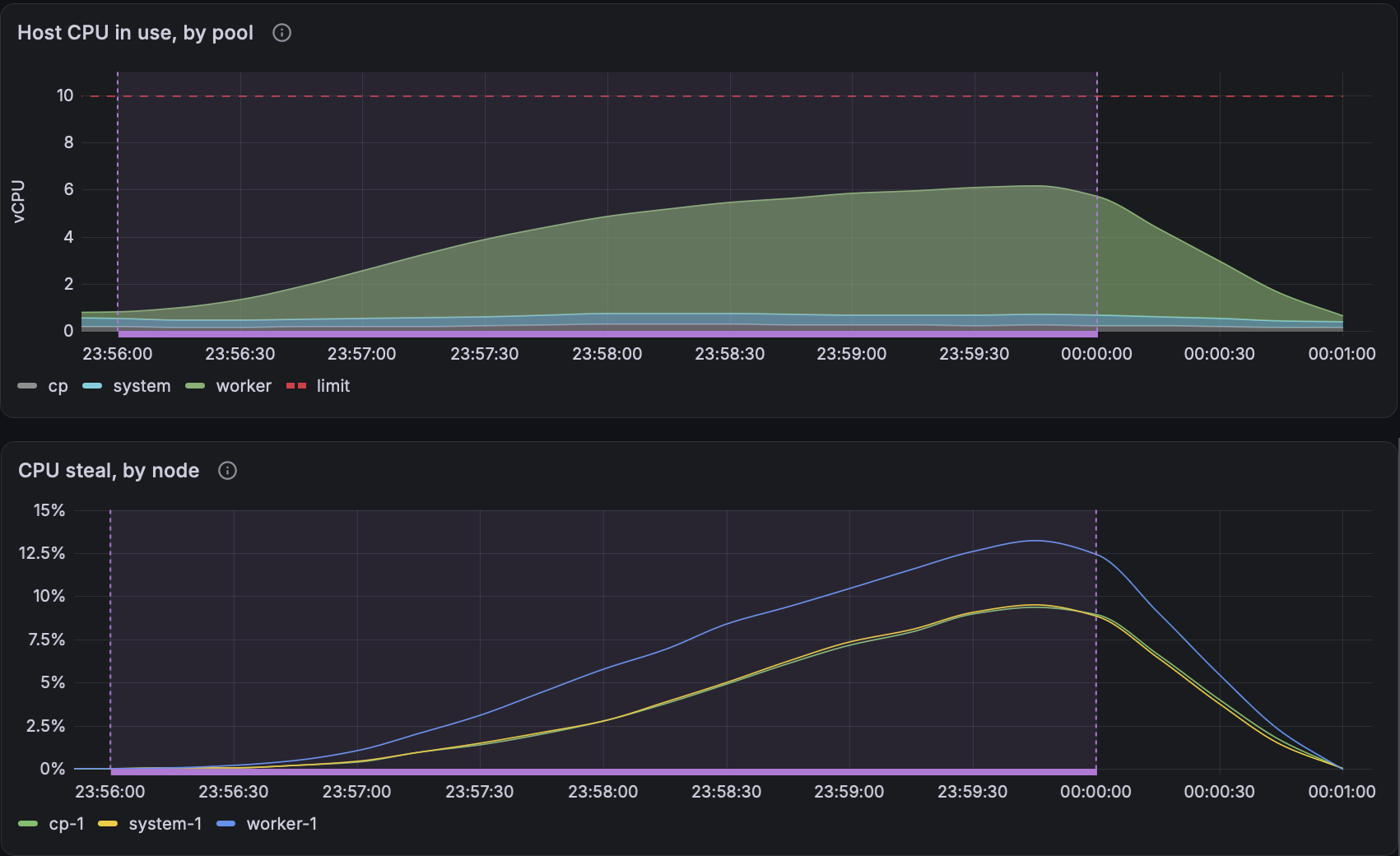
The same story repeats: CPU steal rises and stalls the API and Redis, Redis connections pile up and Go scheduler waits grow, requests queue in the API, and 503s start getting thrown.
The difference is that the API is nowhere near its CPU limit now, sitting at around 3 of its 5 vCPU.
We’ve hit the limit of the box again, but this time at ~30k clean rps.
What one box taught me about scaling
Section titled “What one box taught me about scaling”I could have run these tests on my laptop and called it done, but then I’d have missed most of what I learnt:
- Measuring first matters. Without it, I wouldn’t have ditched Envoy: it’s a standard deployment pattern, and I’d never have questioned it without seeing its cost first-hand.
- Bottlenecks can be deceiving if you don’t know where to look. Without measuring CPU steal and Go scheduler wait, I’d still think the problem in Part 2 was Redis.
The cloud has preached to a very wide audience that horizontal scaling is all you need, and for a long time I sang in that choir.
Even in a system this simple, though, bottlenecks showed up in unexpected places, like Envoy and my home internet’s upload speed. Scaling out would have hidden Envoy’s cost instead of fixing it: I’d just have paid for more machines.
The code, k6 scripts and Kubernetes manifests are on GitHub. If you run a homelab, load test something on it. Odds are the first bottleneck won’t be your code either.